Creating a professional website used to require technical knowledge, coding skills, and often the help of a developer. Today, AI website builders have made the process much simpler. Appy Pie AI Website Builder is designed to help beginners, small businesses, entrepreneurs, freelancers, and creators build websites without writing code.
In this Appy Pie AI Website Builder Review, we will look at how the platform works, its AI website creation features, templates, customization options, ease of use, pricing considerations, SEO tools, mobile responsiveness, hosting, and the overall website-building experience. The goal is to help you understand whether Appy Pie AI Website Builder can be a practical solution for creating a professional website without coding.
What Is Appy Pie AI Website Builder?
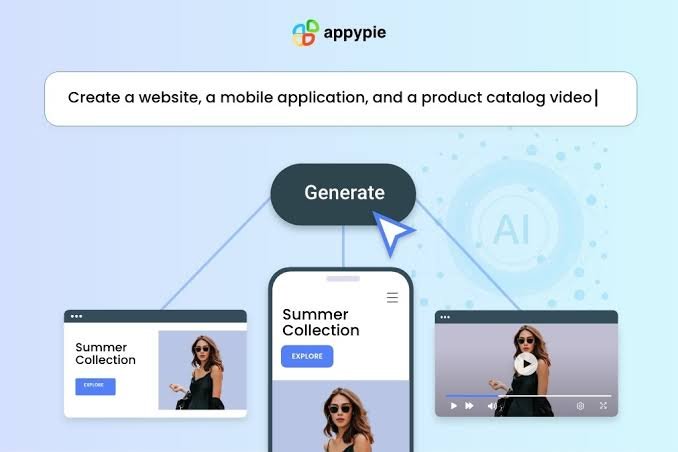
Appy Pie AI Website Builder is an AI-powered website creation platform that allows users to generate websites without needing HTML, CSS, JavaScript, or other programming languages. Instead of starting with a blank page, users can describe the type of website they want, and the AI-assisted platform can help create the basic website structure.
The main idea behind the Appy Pie AI Website Builder is simplicity. A user can provide information about their business, website purpose, industry, or preferred style and then use the generated website as a starting point.
This approach can be particularly useful for people who want to create a business website but do not have experience with traditional web development.
Who Can Use Appy Pie AI Website Builder?
The platform can be useful for different types of users, including:
- Small business owners who need a business website.
- Entrepreneurs launching a new online venture.
- Freelancers creating a professional online presence.
- Bloggers who want a simple website.
- Service providers who want to showcase their services.
- Creators building an online portfolio.
- Beginners who do not know how to code.
- Local businesses that need an online presence.
Because the Appy Pie AI Website Builder focuses on no-code website creation, users can spend more time working on their content and business rather than dealing with complicated development tasks.
How Does Appy Pie AI Website Builder Work?
One of the biggest advantages of an AI website builder is that it can simplify the initial website creation process. Instead of manually selecting every element, the user can provide information about the desired website and let the AI help generate a starting point.
The process generally involves providing details about the website, selecting or reviewing the generated design, customizing the content, and preparing the website for publication.
Step 1: Describe Your Website
The first step is to provide information about what you want to build.
For example, a business owner could describe a website for a digital marketing agency. The information could include the business name, services, target customers, location, and overall purpose of the website.
The more useful information you provide, the easier it becomes to create a website structure that matches your requirements.
Step 2: Let AI Generate the Website
The AI-powered functionality can help create the initial website structure based on the information you provide.
Instead of manually designing every page from scratch, you receive a starting point that can then be customized.
This is one of the main reasons people consider an Appy Pie AI Website Builder Review before choosing the platform. The biggest question is not simply whether AI can generate a website, but whether the generated website is useful enough to reduce the amount of manual work.
Step 3: Customize Your Website
After the initial website is generated, you can make changes to the content and design.
Depending on the website requirements, customization may include editing:
- Text
- Images
- Buttons
- Colors
- Fonts
- Sections
- Navigation
- Contact information
- Service descriptions
- Business information
This no-code approach means users can make changes without directly editing source code.
Appy Pie AI Website Builder Features
The feature set is an important part of any Appy Pie AI Website Builder Review. An AI website builder should do more than simply create a homepage. It should provide tools that help users build, customize, manage, and publish a complete website.
AI-Powered Website Creation
The primary feature is AI-assisted website generation.
Instead of spending hours deciding where to place every section, users can start by describing their requirements. AI can then help generate a website structure based on the information provided.
For beginners, this can reduce the learning curve associated with traditional website design.
No-Code Website Building
You do not need to know programming languages to use a no-code website builder.
This is particularly useful for small businesses that cannot justify hiring a developer for a basic website.
With the Appy Pie AI Website Builder, the focus is on visual editing and simplified website management rather than writing code.
Website Templates and Design
Templates can help users start with a professionally structured layout rather than designing everything from scratch.
A good template provides a foundation for:
- Business websites
- Portfolio websites
- Service websites
- Personal websites
- Landing pages
- Small business websites
Users can then modify the layout and content to match their brand.
Mobile-Friendly Websites
Mobile responsiveness is essential for modern websites because many visitors access websites from smartphones and tablets.
A website created with an AI website builder should therefore provide a responsive experience across different screen sizes.
For business owners, this means the website needs to remain easy to read and navigate whether someone visits from a desktop computer, smartphone, or tablet.
Drag-and-Drop Editing
A visual editing environment makes it easier for beginners to modify their websites.
Instead of manually changing HTML or CSS, users can work with website elements through the editor.
This approach can make routine changes much faster, particularly when updating business information or adding new sections.
Building a Website Without Coding

The biggest selling point of Appy Pie AI Website Builder is the ability to create a website without traditional coding.
For someone familiar with WordPress, HTML, CSS, or website development, this may not seem particularly complicated. However, for a beginner, avoiding technical setup can make a significant difference.
Why No-Code Website Building Matters
Traditional website development can involve:
- Choosing hosting.
- Installing a CMS.
- Selecting a theme.
- Installing plugins.
- Configuring the design.
- Creating pages.
- Managing technical settings.
- Maintaining updates.
- Troubleshooting problems.
A no-code AI website builder aims to simplify many of these steps.
This makes Appy Pie AI Website Builder appealing to people who want to focus on their business rather than website development.
Appy Pie AI Website Builder for Small Businesses
Small businesses often need a website but may not have the budget or technical resources to build a completely custom website.
For example, a local photographer could create a website containing:
- Home
- About
- Services
- Portfolio
- Testimonials
- Contact
A consultant could create a similar website featuring their professional background, services, case studies, and contact information.
For these types of websites, the simplicity of the Appy Pie AI Website Builder can be useful.
Business Website Content
A professional business website should provide visitors with clear information.
Important elements include:
- Business name
- Company description
- Products or services
- Contact details
- Call-to-action buttons
- Customer testimonials
- Images
- Frequently asked questions
- Location information where relevant
AI can help users create initial content, but the final copy should always be reviewed and customized.
Generic AI-generated text may not accurately communicate a company’s unique selling points, experience, pricing, or policies.
Appy Pie AI Website Builder for Beginners
Beginners are one of the primary audiences for no-code website builders.
If you have never created a website before, the traditional process can seem overwhelming. Terms such as DNS, hosting, HTML, CSS, plugins, themes, databases, and servers can create unnecessary barriers.
An AI website builder reduces much of that technical complexity.
Easy Website Creation
The biggest benefit for beginners is the ability to start with an existing structure.
Instead of asking, “How do I design a website?”, you can begin with a more practical question:
“What information should my website contain?”
That shift makes the website creation process easier to understand.
SEO Features and Website Optimization
SEO is an important consideration when choosing any website builder.
A professional website needs more than an attractive design. Search engines need to understand the website’s content, structure, and relevance.
When using the Appy Pie AI Website Builder, website owners should pay attention to important SEO elements such as:
- Page titles
- Meta descriptions
- Heading structure
- Image optimization
- Internal linking
- Mobile responsiveness
- Page speed
- Clean website structure
- Relevant keywords
- Useful original content
AI and SEO Content
AI can help generate initial website content, but automatically generated text should not simply be published without editing.
For better SEO, your website content should provide genuine value and clearly explain your products, services, or expertise.
For example, instead of publishing a generic paragraph about a digital marketing agency, create content explaining your specific services, experience, industries served, locations, and results.
The Appy Pie AI Website Builder can help with the website creation process, but your content strategy still plays an important role in search visibility.
Appy Pie AI Website Builder for Landing Pages
Landing pages are another potential use case for an AI website builder.
A landing page can be created for:
- Product promotions
- Advertising campaigns
- Lead generation
- Newsletter subscriptions
- Events
- Services
- Online courses
- Special offers
A landing page should have a clear objective.
For example, if your goal is lead generation, the page could focus on a headline, supporting information, benefits, and a contact form.
The Appy Pie AI Website Builder can help users create the basic structure without requiring coding knowledge.
Website Customization
AI-generated websites are useful as starting points, but customization is what makes a website feel unique.
A professional website should reflect the company’s branding.
Colors and Fonts
Your website colors should match your brand identity.
For example, a technology company might use a modern visual style, while a luxury business may prefer a more refined design.
Typography also affects readability and branding. Avoid using too many fonts on one website.
Images
High-quality images can make a website more engaging.
Business websites should use relevant images instead of relying entirely on generic stock photographs.
For example, a restaurant can showcase its actual dishes, while a service business can show its team, office, projects, or completed work.
Appy Pie AI Website Builder Pricing
Pricing is an important part of any Appy Pie AI Website Builder Review.
Website builder pricing can change over time, and the available plans, features, storage, domains, publishing options, and promotional offers may vary.
Before purchasing a plan, users should check the current pricing page and compare what is included in each package.
When evaluating the cost, consider more than the monthly subscription price.
Look at:
- Website publishing
- Custom domain support
- Storage
- Bandwidth
- Templates
- AI features
- SEO tools
- Forms
- Customer support
- E-commerce functionality
- Marketing features
The cheapest plan is not always the most suitable option if important features are restricted.
Appy Pie AI Website Builder Pros and Cons
Understanding the advantages and limitations can make your decision easier.
Pros of Appy Pie AI Website Builder
- No coding required
- AI-assisted website creation
- Beginner-friendly approach
- Faster initial website setup
- Visual website editing
- Useful for small businesses
- Suitable for simple professional websites
- Can reduce dependence on developers
- Useful for landing pages and service websites
- Simplifies the website creation process
Cons of Appy Pie AI Website Builder
- AI-generated designs may require customization
- Advanced users may want greater control
- Pricing depends on the features required
- Complex websites may require specialized platforms
- AI-generated content should be reviewed
- Some advanced functionality may require additional configuration
These limitations do not necessarily make the platform unsuitable. They simply show that an AI website builder is not designed for every type of website.
Appy Pie AI Website Builder vs Traditional Website Development

The biggest difference between an AI website builder and traditional web development is the amount of technical involvement.
With traditional development, you may need a designer and developer to create a custom website.
With an AI website builder, the initial design and structure can be created much faster.
However, custom development provides greater control over functionality, architecture, integrations, and specialized features.
Which Approach Makes Sense?
An AI website builder can make sense when you need:
- A simple business website
- A portfolio
- A service website
- A landing page
- A basic online presence
- A website quickly
Traditional development may be more appropriate when you need:
- Complex web applications
- Advanced databases
- Custom software
- Highly specialized integrations
- Complex user accounts
- Unique functionality
The right choice depends on the type of website you are building.
Is Appy Pie AI Website Builder Good for SEO?
An AI website builder can provide a foundation for SEO, but no website builder automatically guarantees search rankings.
SEO depends on many factors, including content quality, website structure, technical performance, backlinks, search intent, competition, and user experience.
If you use Appy Pie AI Website Builder for an SEO-focused website, concentrate on creating useful content around topics your target audience actually searches for.
Use descriptive page titles, logical headings, relevant keywords, optimized images, internal links, and clear calls to action.
Most importantly, avoid creating large amounts of generic AI content simply to increase the number of pages on your website.
Is Appy Pie AI Website Builder Easy to Use?
Ease of use is one of the strongest reasons to consider an AI website builder.
The no-code approach removes many technical barriers that beginners face.
If you can explain your business and understand basic website concepts, you can start building a website without becoming a web developer.
The AI-assisted workflow can also help users overcome the blank-page problem. Instead of starting with nothing, you receive a basic website structure that can be edited.
Who Should Use Appy Pie AI Website Builder?
Appy Pie AI Website Builder can be a practical option for people who want a relatively simple website without learning web development.
It may be suitable for:
Small Businesses
Small businesses can use an AI website builder to establish an online presence and provide customers with essential information.
Freelancers
Freelancers can create websites showcasing their services, portfolios, testimonials, and contact information.
Entrepreneurs
New businesses can use an AI website builder to create an initial website while they focus on developing their products and services.
Beginners
People without coding experience can benefit from a simplified website creation process.
Marketing Teams
Marketing professionals can use website builders to create landing pages and campaign-specific pages without depending on developers for every small change.
Who May Need Another Solution?
Not every website project is suitable for an AI website builder.
If your project requires highly customized functionality, complex databases, advanced user management, or a unique web application, you may need a more flexible development platform.
Large businesses with extensive technical requirements may also need a dedicated development team or enterprise-focused solution.
The important question is not whether an AI website builder is universally better than traditional development. The better question is whether it provides the features your particular project requires.
Tips for Creating a Professional Website With Appy Pie AI Website Builder
If you decide to use the platform, a few practices can improve the final result.
Start With a Clear Website Brief
Before generating your website, prepare information about your business, target audience, services, brand style, and website goals.
Edit AI-Generated Content
Do not publish AI-generated content without reviewing it.
Add your own experience, examples, pricing information, customer information, and unique business details.
Keep Navigation Simple
Visitors should be able to find important information quickly.
A simple navigation structure often works better than a complicated menu.
Use Strong Calls to Action
Tell visitors what to do next.
Examples include:
- Contact Us
- Get a Quote
- Book a Consultation
- Start a Free Trial
- Request Information
- View Services
Optimize for Mobile
Always check how your website looks on smartphones and tablets.
A website that looks good only on desktop computers can create a poor user experience.
Must Read:
- GoHighLevel Website Builder Review: Is It Worth Using in 2026?
- HostGator AI Website Builder Review: Is It Good for Small Businesses?
- IONOS AI Website Builder Review: How Easy Is It to Build a Website?
Final Verdict:
The Appy Pie AI Website Builder provides a simplified way to create a website without traditional coding. Its AI-assisted approach can help beginners generate a website structure, while no-code editing allows users to customize the website without needing advanced technical skills.
For small businesses, freelancers, entrepreneurs, creators, and beginners, this type of website builder can reduce the time and technical knowledge required to establish an online presence.
However, an AI-generated website should be treated as a starting point rather than a finished product. Professional results still require good content, thoughtful branding, relevant images, clear navigation, SEO optimization, mobile testing, and regular updates.
If your goal is to build a professional website without coding, Appy Pie AI Website Builder is worth considering. It is particularly relevant for users who value simplicity and want to avoid the technical work associated with traditional website development.
For highly customized web applications or projects requiring advanced functionality, a more flexible development platform may be more appropriate.
Overall, the main attraction of Appy Pie AI Website Builder is its ability to make website creation more accessible. Instead of spending your time learning how to code a website, you can focus on defining your business, creating useful content, customizing your design, and building an online presence that serves your audience.