Building a modern website often involves a combination of design, development, content management, responsive layouts, and ongoing maintenance. For developers and businesses, managing all of these areas can take considerable time. No-code and visual development platforms aim to simplify that process, and Plasmic AI Website Builder is designed around this idea.
In this Plasmic AI Website Builder Review, we will look at how Plasmic works, its visual development approach, AI capabilities, website design workflow, CMS functionality, integrations, developer features, SEO considerations, customization options, advantages, limitations, and the types of users who may benefit from the platform.
Plasmic is particularly interesting because it sits between traditional website builders and developer-focused tools. It provides a visual interface for creating pages while also supporting integration with modern web development workflows. That combination can make it useful for teams that want visual editing without completely giving up developer control.
What Is Plasmic AI Website Builder?
Plasmic AI Website Builder is a visual development platform designed to help users create web pages and digital experiences without having to manually code every part of the interface.
Rather than functioning only as a traditional drag-and-drop website builder, Plasmic can work alongside modern web development technologies. This makes it different from basic website builders that are primarily designed for users who want to create a website entirely within a closed platform.
The platform focuses heavily on visual page building, reusable components, responsive layouts, content management, and integration with existing applications.
For developers, Plasmic can provide a visual layer on top of a code-based application. For marketers and content teams, it can offer a way to create and update pages without asking developers to make every content or layout change.
What Makes Plasmic Different?
The key difference is flexibility.
A simple website builder generally gives you a collection of templates and editing controls. Plasmic can go further by allowing teams to connect visual pages with existing code and application components.
This means developers can retain control over the underlying application while non-technical team members can work with the visual interface.
That makes the Plasmic AI Website Builder particularly relevant to startups, product teams, marketing departments, and developers working on modern web applications.
How Does Plasmic AI Website Builder Work?
The Plasmic workflow can vary depending on how you use the platform. Some users may work primarily within its visual environment, while developers may integrate Plasmic with an existing application.
The basic concept is straightforward.
You create or edit a page visually, arrange components, configure responsive behavior, add content, and then publish or integrate the resulting experience into your web project.
Visual Page Building
The visual editor allows users to work with page elements without writing every piece of frontend code manually.
You can create layouts using components and sections, adjust spacing, modify typography, add images, configure buttons, and organize content.
For designers and marketers, this can make the process more visual and intuitive.
Working With Components
Components are an important part of modern web development.
Instead of recreating the same navigation bar, pricing card, button, or content section repeatedly, teams can use reusable components.
This approach can improve consistency across a website.
For developers, component-based development is already familiar. Plasmic provides a visual environment that can make those components accessible to people who do not want to work directly inside the codebase.
Plasmic AI Features
The AI side of the platform is an important consideration in this Plasmic AI Website Builder Review.
AI-powered development tools are increasingly being used to generate layouts, content, code, components, and design ideas. Plasmic has incorporated AI-related capabilities into its visual development workflow to help users work more efficiently.
AI can be particularly useful for speeding up repetitive tasks and helping users move from an idea to an initial design.
However, AI should be treated as an assistant rather than a replacement for design and development decisions.
AI-Assisted Website Creation
AI can help users move faster when creating web experiences.
Instead of manually starting every page from a blank canvas, AI-assisted workflows can help generate initial structures or content that can then be reviewed and modified.
This can be useful when creating:
- Landing pages
- Marketing pages
- Product pages
- Documentation pages
- Campaign pages
- Business websites
- Content-driven experiences
The advantage is not necessarily that AI produces a perfect website immediately. The greater benefit is reducing the amount of repetitive work involved in reaching a usable first version.
Plasmic for Developers
One of the most interesting aspects of Plasmic AI Website Builder is that it is not limited to people who want a completely code-free environment.
Developers can use Plasmic alongside their existing development workflows.
This can be useful when a team has an existing React-based application or another modern web project and wants to introduce visual editing capabilities.
Developer Control
Developers can define components and make them available within the visual environment.
This creates a connection between design and development.
For example, a developer could create a custom pricing component and allow a marketing team to place that component on different pages through the visual editor.
The developer maintains control over the component’s underlying behavior while the marketing team can manage how and where it appears.
This approach can reduce unnecessary back-and-forth between developers and content teams.
Plasmic for Marketers
Marketing teams frequently need to publish new pages quickly.
A traditional workflow may require a marketer to create a design, send it to a developer, wait for implementation, review the result, request changes, and then wait again.
A visual development platform can shorten this process.
With Plasmic AI Website Builder, marketing teams can potentially work more independently within the visual environment.
They can create or modify page layouts, update content, and manage visual elements without needing to write frontend code for every change.
Faster Landing Page Creation
Landing pages are particularly suitable for this workflow.
A marketing team might need several landing pages for different campaigns, products, or advertising channels.
Instead of creating every page from scratch, reusable components can provide a consistent foundation.
This can make it easier to maintain branding across multiple campaigns.
Plasmic and No-Code Website Development
The term “no-code” can mean different things depending on the platform.
For some website builders, no-code means users never need to interact with programming concepts.
Plasmic takes a somewhat different approach.
It can be used visually, but it also supports developer-oriented workflows. That makes it attractive to organizations that want both visual editing and technical flexibility.
For a beginner who has never worked with websites, Plasmic may require more understanding than a basic template-based website builder.
For developers and technical teams, however, that flexibility can be a major advantage.
Website Design and Customization
Design flexibility is an important part of any Plasmic AI Website Builder Review.
A professional website needs to match the company’s visual identity. Users should be able to control typography, spacing, colors, layouts, images, buttons, and responsive behavior.
Plasmic’s visual environment allows users to work with these design elements without manually writing CSS for every adjustment.
Responsive Design
Modern websites need to work across different screen sizes.
A desktop layout may not automatically work well on a smartphone. Elements can become too wide, text can become difficult to read, and navigation can become inconvenient.
Responsive controls allow designers and developers to adjust how components behave across different screen sizes.
This is particularly useful when creating marketing pages that need to look professional on desktops, tablets, and smartphones.
Plasmic CMS Capabilities
Content management is another important area.
Many websites need content that changes frequently. Blog posts, product information, landing pages, case studies, announcements, and other content may need regular updates.
A visual platform with CMS capabilities can make these changes easier for content teams.
Instead of changing the underlying application code every time content changes, the content can be managed through a structured system.
Dynamic Content
Dynamic content can be useful for websites with large amounts of information.
For example, a company might have:
- Hundreds of products
- Multiple service pages
- Numerous case studies
- Blog content
- Documentation
- Customer profiles
Using structured content makes it easier to maintain consistency across pages.
Plasmic and SEO
SEO should be considered before choosing any website builder.
A visually attractive website will not automatically receive search traffic.
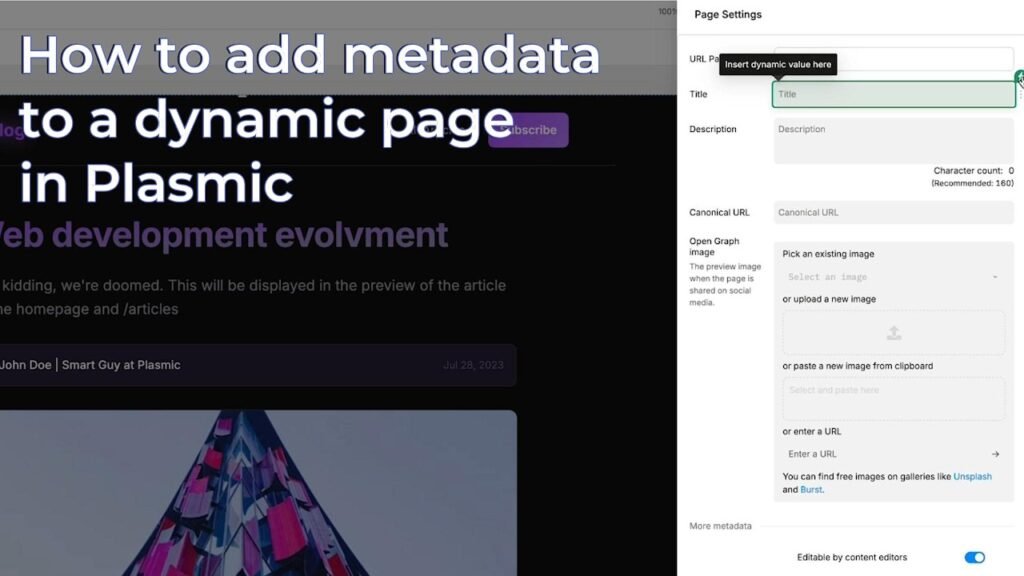
Search engine optimization depends on factors such as content quality, page structure, technical performance, mobile usability, internal linking, metadata, and authority.
When using Plasmic AI Website Builder, website owners should pay attention to standard SEO practices.
Important SEO Elements
Make sure your pages have:
- Descriptive page titles
- Useful meta descriptions
- Logical heading structures
- Search-intent-focused content
- Optimized images
- Internal links
- Mobile-friendly layouts
- Clean URLs
- Fast-loading pages
- Clear navigation
AI can help generate initial content, but it should be reviewed carefully.
Search-focused content should answer real questions and provide useful information rather than simply repeating keywords.
Plasmic for Business Websites
Businesses can use Plasmic AI Website Builder to create a wide variety of web experiences.
A professional company website could include:
- Homepage
- About page
- Services
- Product pages
- Pricing
- Case studies
- Blog
- Contact page
- FAQ
- Landing pages
The visual editor can make it easier to maintain these pages over time.
For companies with internal developers, the combination of visual editing and code integration can be particularly useful.
Plasmic for Startups
Startups often need to move quickly.
During the early stages of a business, the website can change frequently as the product, branding, messaging, and marketing strategy evolve.
A rigid development workflow can slow down experimentation.
Plasmic can help teams create and update web experiences while maintaining a connection to their existing application architecture.
Testing Different Ideas
A startup might want to test:
- Different landing page designs
- New pricing layouts
- Alternative messaging
- Product positioning
- Campaign pages
- Lead-generation forms
A visual development workflow can make these changes easier to implement.
Plasmic Integrations
Integrations are important for modern websites.
A website rarely works alone. It may need to connect with analytics platforms, content management systems, APIs, databases, authentication systems, marketing tools, and other services.
Plasmic’s developer-oriented approach can be useful for teams that need to connect visual page building with existing technology.
This is one of the areas where Plasmic can differ significantly from basic website builders.
Instead of forcing an organization to rebuild its entire website inside a new ecosystem, the platform can be incorporated into an existing development workflow.
Plasmic AI Website Builder Pricing
Pricing is an important factor when evaluating any website development platform.
The exact Plasmic AI Website Builder pricing structure and available features can change over time, so users should check the official pricing information before choosing a plan.
When comparing plans, do not look only at the monthly cost.
Consider:
- Number of projects
- Team members
- Collaboration features
- Visual editing capabilities
- CMS functionality
- Publishing options
- Developer features
- Integrations
- Support
- Usage limits
For a business, the right plan depends on the number of websites, team members, content requirements, and technical architecture.
Pros and Cons of Plasmic AI Website Builder
Understanding both benefits and limitations provides a more balanced view of the platform.
Pros of Plasmic AI Website Builder
- Visual website development
- AI-assisted workflows
- Useful for developers and marketers
- Component-based approach
- Flexible customization
- Responsive design capabilities
- Can work with modern development workflows
- Useful for landing pages
- Suitable for marketing teams
- Supports reusable components
- Can reduce developer dependency for content changes
Cons of Plasmic AI Website Builder
- May have a learning curve for complete beginners
- Advanced features can require technical knowledge
- Not every project needs its developer-oriented flexibility
- Complex integrations may require developer involvement
- AI-generated output still needs human review
- Pricing can vary depending on project requirements
The main limitation is that Plasmic may not be the simplest possible solution for someone who only wants a basic five-page website.
Plasmic vs Traditional Website Development
Traditional website development provides extensive control but requires more technical involvement.
A developer may need to manually build:
- Components
- Layouts
- Responsive styles
- Content systems
- Page templates
- Integrations
- Deployment workflows
Plasmic can reduce some of this work through visual development and reusable components.
However, traditional development still has advantages when a project requires highly specialized functionality.
The choice depends on the website’s requirements.
Plasmic vs Basic Website Builders
Basic website builders are usually designed around simplicity.
They can be excellent for people who want to create a website quickly using templates.
Plasmic takes a more developer-friendly approach.
It can provide greater flexibility for teams that want visual editing while retaining control over the technology behind the website.
For a simple personal website, a basic builder may be sufficient.
For a startup with an existing application and a marketing team that needs to create pages independently, Plasmic may provide a more suitable workflow.
Is Plasmic AI Website Builder Good for Beginners?
The answer depends on what kind of beginner you are.
If you have never worked with website design or development, you may need some time to understand the platform’s concepts.
If you already understand basic website structures, page layouts, components, and responsive design, the learning process may be easier.
The platform’s flexibility can be valuable, but flexibility often comes with additional concepts to learn.
Is Plasmic Good for Professional Websites?
Plasmic can be used to create professional web experiences, particularly when the website is managed by a team that understands modern web development.
Professional results depend on more than the tool itself.
You still need:
- Strong branding
- Useful content
- Good typography
- Consistent spacing
- High-quality images
- Mobile optimization
- Fast performance
- Clear navigation
- Effective calls to action
- SEO planning
A website builder provides the tools, but the quality of the final website depends heavily on how those tools are used.
Tips for Using Plasmic AI Website Builder
If you decide to use Plasmic AI Website Builder, start by defining your website architecture.
Before designing pages, decide what your visitors need to find.
Create a Simple Site Structure
For a business website, a basic structure might include:
Home → Services → About → Case Studies → Blog → Contact
This gives visitors a clear path through the website.
Build Reusable Components
Instead of creating every section independently, create reusable components wherever possible.
This can make future changes much easier.
For example, a reusable button or testimonial component can maintain consistent styling across multiple pages.
Keep Your Design Consistent
Use a consistent system for:
- Fonts
- Colors
- Buttons
- Headings
- Spacing
- Images
- Cards
Consistency makes a website feel more professional.
Review AI-Generated Content
AI-generated copy can save time, but it should always be reviewed.
Add specific information about your business and remove generic statements.
Your website should sound like your brand, not like a collection of generic AI paragraphs.
Must Read:
- Appy Pie AI Website Builder Review: Build a Professional Website Without Coding
- GoHighLevel Website Builder Review: Is It Worth Using in 2026?
- HostGator AI Website Builder Review: Is It Good for Small Businesses?
Final Verdict:
The Plasmic AI Website Builder takes an interesting approach to website creation by combining visual development with developer-oriented flexibility.
Its biggest strength is that it does not have to be limited to a simple template-based website-building workflow. Developers can work with components and existing application technologies, while marketers and content teams can use visual tools to create and manage web experiences.
For startups, product teams, developers, and marketing departments, this combination can make website development more collaborative.
The platform can also be useful for creating landing pages, marketing websites, dynamic content experiences, and other web projects where teams need both design flexibility and technical control.
At the same time, Plasmic AI Website Builder may not be the most straightforward choice for someone who simply wants a basic personal website with minimal setup. Its broader capabilities can introduce concepts that complete beginners may need time to understand.
The AI features can help speed up the creation process, but users should still review AI-generated designs and content carefully. Human input remains important for branding, usability, SEO, accessibility, and overall website quality.
If your goal is to simplify web development while maintaining more control than a traditional website builder provides, Plasmic is a platform worth evaluating. Its combination of visual editing, reusable components, CMS capabilities, AI-assisted workflows, and developer integration makes it particularly relevant for modern web teams.
Ultimately, the best way to evaluate Plasmic AI Website Builder is to consider your project’s requirements. If you need a simple website with minimal customization, a basic website builder may be enough. If you need a flexible visual development environment that can work alongside a modern application, Plasmic offers a different approach worth exploring.